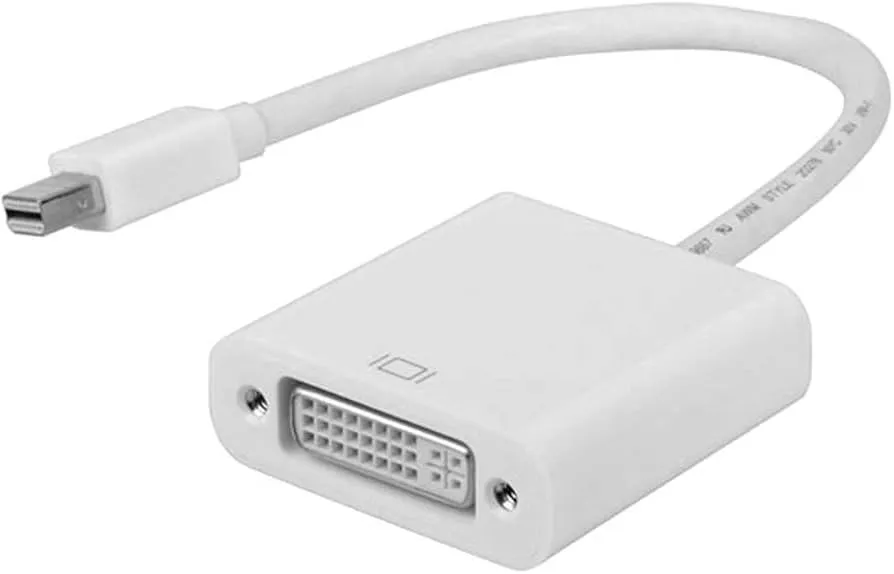
Mini-DP & DVI Adapters & Cables
new
Description
DESCRIPTION
Mini-DisplayPort (Mini-DP) → DVI adapter is a small video signal converter that lets you connect a device with a Mini-DisplayPort output (like many laptops, tablets, or graphics cards) to a DVI-equipped monitor, projector, or display
Key Features of a Mini-DP → DVI Adapter
Video Signal Conversion
Converts the Mini-DisplayPort output from your computer or laptop into a DVI-compatible video signal, enabling connection to older monitors, projectors, or TVs with DVI inputs.
Supported Resolutions
Usually supports up to 1920×1200 or 1080p @ 60 Hz — suitable for most standard monitors and projectors.
Plug-and-Play
No drivers or software required — just plug it into the Mini-DP port and connect a DVI cable to your display.
Passive (Most Models)
Many adapters are passive, meaning they rely on the Mini-DP port supporting DisplayPort++ (DP++) to output a DVI signal directly.
Secure Connection
Some adapters support screw locking DVI cables to prevent accidental disconnection.
Compatibility
Works with a wide range of devices that have Mini-DP or Thunderbolt (often including MacBooks, Surface devices, laptops, desktops) when the port supports the required signal mode.
Compact & Portable
Small adapter dongle or short cable design makes it easy to carry and ideal for travel or mixed work environments.
OS-Independent
Compatible across operating systems like Windows, macOS, Linux — no special software installation needed.
Optional Active Conversion (Some Models)
Active adapters have built-in electronics to convert the signal even if the Mini-DP port doesn’t support DP++. These can sometimes improve compatibility but tend to cost more.
Supported Resolutions
Usually supports up to 1920×1200 or 1080p @ 60 Hz — suitable for most standard monitors and projectors.
Plug-and-Play
No drivers or software required — just plug it into the Mini-DP port and connect a DVI cable to your display.
Passive (Most Models)
Many adapters are passive, meaning they rely on the Mini-DP port supporting DisplayPort++ (DP++) to output a DVI signal directly.
Secure Connection
Some adapters support screw locking DVI cables to prevent accidental disconnection.
Compatibility
Works with a wide range of devices that have Mini-DP or Thunderbolt (often including MacBooks, Surface devices, laptops, desktops) when the port supports the required signal mode.
Small adapter dongle or short cable design makes it easy to carry and ideal for travel or mixed work environments.
OS-Independent
Compatible across operating systems like Windows, macOS, Linux — no special software installation needed.
Optional Active Conversion (Some Models)
Active adapters have built-in electronics to convert the signal even if the Mini-DP port doesn’t support DP++. These can sometimes improve compatibility but tend to cost more.

Description
DESCRIPTION
Mini-DisplayPort (Mini-DP) → DVI adapter is a small video signal converter that lets you connect a device with a Mini-DisplayPort output (like many laptops, tablets, or graphics cards) to a DVI-equipped monitor, projector, or display
Key Features of a Mini-DP → DVI Adapter
Video Signal Conversion
Converts the Mini-DisplayPort output from your computer or laptop into a DVI-compatible video signal, enabling connection to older monitors, projectors, or TVs with DVI inputs.
Supported Resolutions
Usually supports up to 1920×1200 or 1080p @ 60 Hz — suitable for most standard monitors and projectors.
Plug-and-Play
No drivers or software required — just plug it into the Mini-DP port and connect a DVI cable to your display.
Passive (Most Models)
Many adapters are passive, meaning they rely on the Mini-DP port supporting DisplayPort++ (DP++) to output a DVI signal directly.
Secure Connection
Some adapters support screw locking DVI cables to prevent accidental disconnection.
Compatibility
Works with a wide range of devices that have Mini-DP or Thunderbolt (often including MacBooks, Surface devices, laptops, desktops) when the port supports the required signal mode.
Compact & Portable
Small adapter dongle or short cable design makes it easy to carry and ideal for travel or mixed work environments.
OS-Independent
Compatible across operating systems like Windows, macOS, Linux — no special software installation needed.
Optional Active Conversion (Some Models)
Active adapters have built-in electronics to convert the signal even if the Mini-DP port doesn’t support DP++. These can sometimes improve compatibility but tend to cost more.
Supported Resolutions
Usually supports up to 1920×1200 or 1080p @ 60 Hz — suitable for most standard monitors and projectors.
Plug-and-Play
No drivers or software required — just plug it into the Mini-DP port and connect a DVI cable to your display.
Passive (Most Models)
Many adapters are passive, meaning they rely on the Mini-DP port supporting DisplayPort++ (DP++) to output a DVI signal directly.
Secure Connection
Some adapters support screw locking DVI cables to prevent accidental disconnection.
Compatibility
Works with a wide range of devices that have Mini-DP or Thunderbolt (often including MacBooks, Surface devices, laptops, desktops) when the port supports the required signal mode.
Small adapter dongle or short cable design makes it easy to carry and ideal for travel or mixed work environments.
OS-Independent
Compatible across operating systems like Windows, macOS, Linux — no special software installation needed.
Optional Active Conversion (Some Models)
Active adapters have built-in electronics to convert the signal even if the Mini-DP port doesn’t support DP++. These can sometimes improve compatibility but tend to cost more.
Reviews
Sign in to leave a review