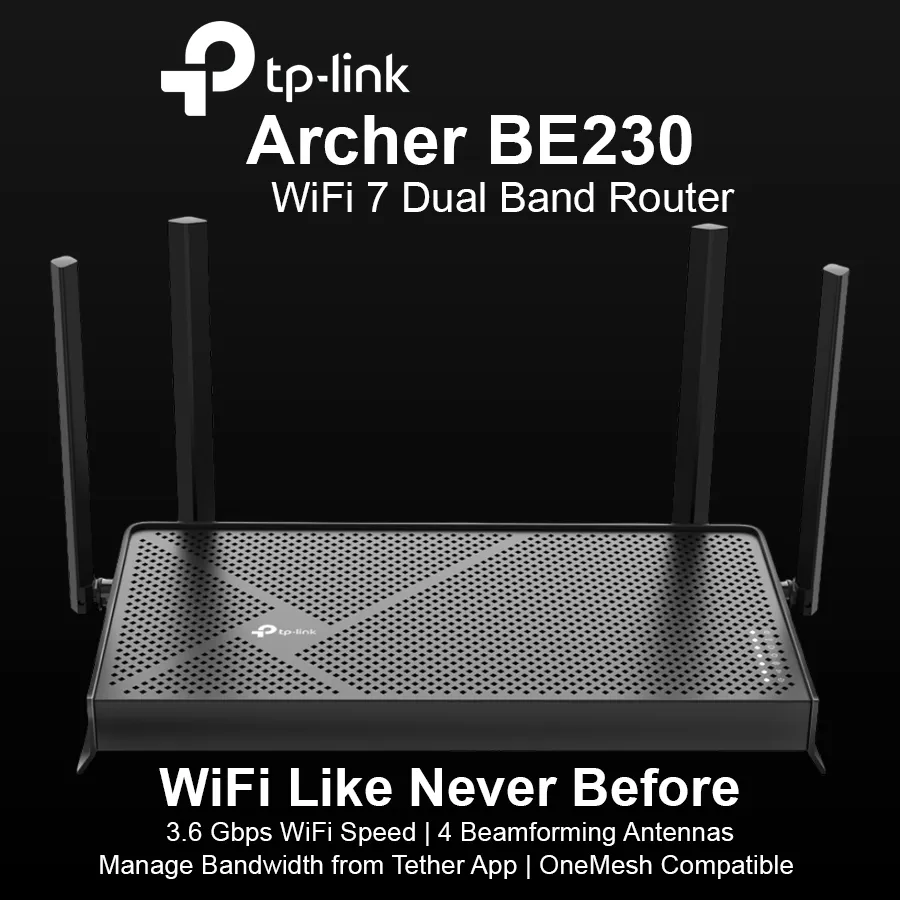
TP Link BE3600 Dual Band Gigabit WiFi 7 Router - Archer BE230
TP Link
Description
3.6 Gbps Dual-Band WiFi 7: Enables your devices to run at full speed. Enjoy fluent 4K/8K streaming, immersive AR/VR gaming, and blazing-fast downloads.†
2× 2.5G Ports: 1× 2.5 Gbps WAN port, 1× 2.5 Gbps LAN port and 3× 1 Gbps LAN ports offer high-speed data transmissions.‡
Maximized Coverage: 4× external antennas along with Beamforming deliver more capacity, stronger and more reliable connections, and less interference.
EasyMesh-Compatible: Works with EasyMesh routers and range extenders to form seamless whole home Mesh WiFi, preventing drops and lag when moving between signals.
Easy Setup and Use: Network management has never been easier with the Tether app.
TP-Link HomeShield: Enhanced security defends against the latest cyber threats.
Great Compatibility: Supports all Wi-Fi generations and devices**and all internet providers.
Next-Level Experience Realized with 3.6 Gbps WiFi 7
Powered by Wi-Fi 7 technology, Archer BE230 delivers an incredible wireless rate of up to 3.6 Gbps, enabling your devices to run at full speed. Enjoy fluent 4K/8K streaming, immersive AR/VR gaming, and blazing-fast downloads.
Multi-Link Operation
Higher speed, lower latency, more reliable
2.5 Gigabit Wired Connections
1× 2.5 Gbps WAN port and 1× 2.5 Gbps LAN port make full use of the Gigabit speeds from your local ISP. Breakthrough the 1G bottleneck and drive your devices to peak performance
USB 3.0 Ports
Easily share files between connected devices by plugging into an external drive. You can even make it your personal cloud storage and access it from outside securely
Boosted WiFi Coverage Throughout Your Home
4× high-performance antennas boost WiFi signals throughout your home. Beamforming technology detects devices and concentrates signals towards them, especially to previously hard-to-reach areas.
Flexibly Create Whole Home Mesh WiFi
Archer BE230 is EasyMesh-compatible. If you have any dead zones at home, just add another EasyMesh router/range extender to further form your whole home multi-gigabit mesh WiFi. No more searching for a stable connection.
WiFi Dead Zone Killer
Eliminate weak signal areas with WiFi coverage for the whole house
Smart Roaming
Uninterrupted streaming when moving around your home
One WiFi Name
No more switching WiFi network names
homeshield Your Security is Our Priority
With TP-Link HomeShield, enjoy advanced security features that deliver a safe environment that protects your family and network's data and privacy
Home Network Scanner
Real-time network scanner to detect potential threats and security issues.
Parental Controls
Manage time online and block inappropriate content to keep your family safe online.
Quality of Service
Assign your favorite devices to have the fastest connections for top performance.
VPN Clients and Server Supported
Allow devices in your home network to access remote VPN servers without needing to install VPN software on every device. Archer BE230 can run both the VPN and ordinary internet connections at the same time, delivering security and flexibility.
Setup Got Easier than Ever
Install the Tether app and simply follow the on-screen directions. In just three easy steps your entire home can be blanketed in strong and reliable WiFi.
WIRELESS
WiFi Speeds: BE3600
• 5 GHz: 2882 Mbps (802.11be)
• 2.4 GHz: 688 Mbps (802.11be)
WiFi Range: 3 Bedroom Houses
4× External Antennas
Multiple antennas form a signal-boosting array to cover more directions and large areas
Beamforming
Concentrates wireless signal strength towards clients to expand WiFi range
WiFi Capacity: High
Dual-Band
Allocate devices to different bands for optimal performance
2×2 MU-MIMO
Simultaneously communicates with multiple MU-MIMO clients
OFDMA
Simultaneously communicates with multiple clients
Airtime Fairness
Improves network efficiency by limiting excessive occupation
DFS
Access an extra band to reduce congestion
4 Streams
Connect your devices to more bandwidth
Advanced Features
• Multi-Link Operation (MLO)
• 4K-QAM
• Multi-RUs
• EasyMesh-Compatible
• Works with Alexa and Google Assistant
• IoT Network
Wireless Mode
• Router Mode
• Access Point Mode
SECURITY
Network Security
• SPI Firewall
• Access Control
• IP & MAC Binding
• Application Layer Gateway
• HomeShield Security
Real-Time IoT Protection
Malicious Site Blocker
Intrusion Prevention System
DDoS Attack Prevention
Home Network Scanner
Guest Network
• 1× 5 GHz Guest Network
• 1× 2.4 GHz Guest Network
VPN Server
• OpenVPN Server
• PPTP VPN Server
• L2TP VPN Server
• WireGuard VPN Server
VPN Client
• Open VPN Client
• PPTP VPN Client
• L2TP VPN Client
• WireGuard VPN Client
WiFi Encryption
• WPA
• WPA2
• WPA3
• WPA/WPA2-Enterprise (802.1x)
HARDWARE
Ethernet Ports
• 1× 2.5 Gbps WAN
• 1× 2.5 Gbps LAN
• 3× 1 Gbps LAN
USB Support: 1× USB 3.0
Supported Partition Formats: NTFS, exFAT, HFS+, FAT32
Supported Functions:
FTP Server
Media Server
Samba Server
Buttons
• Power On/Off Button
• Wi-Fi On/Off Button
• LED Button
• WPS Button
• Reset Button
Power: 12 V ⎓ 2 A (US)
12 V ⎓ 1.5 A (EU)
SOFTWARE
Protocol
• IPv4
• IPv6
EasyMesh
Compatible with EasyMesh
Parental Controls
HomeShield Parental Controls
Custom Profiles
Professional Content Filter Library
Family Time
Bedtime
Off Time
Time Rewards
Family Online Time Ranking
Pause the Internet
Weekly and Monthly Reports
WAN Type
• Dynamic IP
• Static IP
• PPPoE
• PPTP
• L2TP
Quality of Service
QoS by Device
Cloud Service
• Auto Firmware Upgrade
• TP-Link ID
• DDNS
NAT Forwarding
• Port Forwarding
• Port Triggering
• DMZ
• UPnP
IPTV
• IGMP Proxy
• IGMP Snooping
• Bridge
• Tag VLAN
DHCP
• Address Reservation
• DHCP Client List
• Server
DDNS
• TP-Link
• NO-IP
• DynDNS
Management Features
• Tether App
• Webpage
Network Services Enabled by Default
Web Server
Manage and configure device through web (HTTP/HTTPS)
• Port: 80/443 Protocol: TCP
DNS
• Port: 53 Protocol: TCP & UDP
DHCP Server
IP address assignment (DHCP)
• Port: 67 Protocol: UDP
App management
Manage and configure device through app
• Port: 20001 Protocol: TCP
• Port: 30001 Protocol: TCP
• Port: 20002 Protocol: UDP
System Requirements
Internet Explorer 11+, Firefox 12.0+, Chrome 20.0+, Safari 4.0+, or other JavaScript-enabled browser
Cable or DSL Modem (if needed)
Subscription with an internet service provider (for internet access)

Description
3.6 Gbps Dual-Band WiFi 7: Enables your devices to run at full speed. Enjoy fluent 4K/8K streaming, immersive AR/VR gaming, and blazing-fast downloads.†
2× 2.5G Ports: 1× 2.5 Gbps WAN port, 1× 2.5 Gbps LAN port and 3× 1 Gbps LAN ports offer high-speed data transmissions.‡
Maximized Coverage: 4× external antennas along with Beamforming deliver more capacity, stronger and more reliable connections, and less interference.
EasyMesh-Compatible: Works with EasyMesh routers and range extenders to form seamless whole home Mesh WiFi, preventing drops and lag when moving between signals.
Easy Setup and Use: Network management has never been easier with the Tether app.
TP-Link HomeShield: Enhanced security defends against the latest cyber threats.
Great Compatibility: Supports all Wi-Fi generations and devices**and all internet providers.
Next-Level Experience Realized with 3.6 Gbps WiFi 7
Powered by Wi-Fi 7 technology, Archer BE230 delivers an incredible wireless rate of up to 3.6 Gbps, enabling your devices to run at full speed. Enjoy fluent 4K/8K streaming, immersive AR/VR gaming, and blazing-fast downloads.
Multi-Link Operation
Higher speed, lower latency, more reliable
2.5 Gigabit Wired Connections
1× 2.5 Gbps WAN port and 1× 2.5 Gbps LAN port make full use of the Gigabit speeds from your local ISP. Breakthrough the 1G bottleneck and drive your devices to peak performance
USB 3.0 Ports
Easily share files between connected devices by plugging into an external drive. You can even make it your personal cloud storage and access it from outside securely
Boosted WiFi Coverage Throughout Your Home
4× high-performance antennas boost WiFi signals throughout your home. Beamforming technology detects devices and concentrates signals towards them, especially to previously hard-to-reach areas.
Flexibly Create Whole Home Mesh WiFi
Archer BE230 is EasyMesh-compatible. If you have any dead zones at home, just add another EasyMesh router/range extender to further form your whole home multi-gigabit mesh WiFi. No more searching for a stable connection.
WiFi Dead Zone Killer
Eliminate weak signal areas with WiFi coverage for the whole house
Smart Roaming
Uninterrupted streaming when moving around your home
One WiFi Name
No more switching WiFi network names
homeshield Your Security is Our Priority
With TP-Link HomeShield, enjoy advanced security features that deliver a safe environment that protects your family and network's data and privacy
Home Network Scanner
Real-time network scanner to detect potential threats and security issues.
Parental Controls
Manage time online and block inappropriate content to keep your family safe online.
Quality of Service
Assign your favorite devices to have the fastest connections for top performance.
VPN Clients and Server Supported
Allow devices in your home network to access remote VPN servers without needing to install VPN software on every device. Archer BE230 can run both the VPN and ordinary internet connections at the same time, delivering security and flexibility.
Setup Got Easier than Ever
Install the Tether app and simply follow the on-screen directions. In just three easy steps your entire home can be blanketed in strong and reliable WiFi.
WIRELESS
WiFi Speeds: BE3600
• 5 GHz: 2882 Mbps (802.11be)
• 2.4 GHz: 688 Mbps (802.11be)
WiFi Range: 3 Bedroom Houses
4× External Antennas
Multiple antennas form a signal-boosting array to cover more directions and large areas
Beamforming
Concentrates wireless signal strength towards clients to expand WiFi range
WiFi Capacity: High
Dual-Band
Allocate devices to different bands for optimal performance
2×2 MU-MIMO
Simultaneously communicates with multiple MU-MIMO clients
OFDMA
Simultaneously communicates with multiple clients
Airtime Fairness
Improves network efficiency by limiting excessive occupation
DFS
Access an extra band to reduce congestion
4 Streams
Connect your devices to more bandwidth
Advanced Features
• Multi-Link Operation (MLO)
• 4K-QAM
• Multi-RUs
• EasyMesh-Compatible
• Works with Alexa and Google Assistant
• IoT Network
Wireless Mode
• Router Mode
• Access Point Mode
SECURITY
Network Security
• SPI Firewall
• Access Control
• IP & MAC Binding
• Application Layer Gateway
• HomeShield Security
Real-Time IoT Protection
Malicious Site Blocker
Intrusion Prevention System
DDoS Attack Prevention
Home Network Scanner
Guest Network
• 1× 5 GHz Guest Network
• 1× 2.4 GHz Guest Network
VPN Server
• OpenVPN Server
• PPTP VPN Server
• L2TP VPN Server
• WireGuard VPN Server
VPN Client
• Open VPN Client
• PPTP VPN Client
• L2TP VPN Client
• WireGuard VPN Client
WiFi Encryption
• WPA
• WPA2
• WPA3
• WPA/WPA2-Enterprise (802.1x)
HARDWARE
Ethernet Ports
• 1× 2.5 Gbps WAN
• 1× 2.5 Gbps LAN
• 3× 1 Gbps LAN
USB Support: 1× USB 3.0
Supported Partition Formats: NTFS, exFAT, HFS+, FAT32
Supported Functions:
FTP Server
Media Server
Samba Server
Buttons
• Power On/Off Button
• Wi-Fi On/Off Button
• LED Button
• WPS Button
• Reset Button
Power: 12 V ⎓ 2 A (US)
12 V ⎓ 1.5 A (EU)
SOFTWARE
Protocol
• IPv4
• IPv6
EasyMesh
Compatible with EasyMesh
Parental Controls
HomeShield Parental Controls
Custom Profiles
Professional Content Filter Library
Family Time
Bedtime
Off Time
Time Rewards
Family Online Time Ranking
Pause the Internet
Weekly and Monthly Reports
WAN Type
• Dynamic IP
• Static IP
• PPPoE
• PPTP
• L2TP
Quality of Service
QoS by Device
Cloud Service
• Auto Firmware Upgrade
• TP-Link ID
• DDNS
NAT Forwarding
• Port Forwarding
• Port Triggering
• DMZ
• UPnP
IPTV
• IGMP Proxy
• IGMP Snooping
• Bridge
• Tag VLAN
DHCP
• Address Reservation
• DHCP Client List
• Server
DDNS
• TP-Link
• NO-IP
• DynDNS
Management Features
• Tether App
• Webpage
Network Services Enabled by Default
Web Server
Manage and configure device through web (HTTP/HTTPS)
• Port: 80/443 Protocol: TCP
DNS
• Port: 53 Protocol: TCP & UDP
DHCP Server
IP address assignment (DHCP)
• Port: 67 Protocol: UDP
App management
Manage and configure device through app
• Port: 20001 Protocol: TCP
• Port: 30001 Protocol: TCP
• Port: 20002 Protocol: UDP
System Requirements
Internet Explorer 11+, Firefox 12.0+, Chrome 20.0+, Safari 4.0+, or other JavaScript-enabled browser
Cable or DSL Modem (if needed)
Subscription with an internet service provider (for internet access)
Reviews
Sign in to leave a review