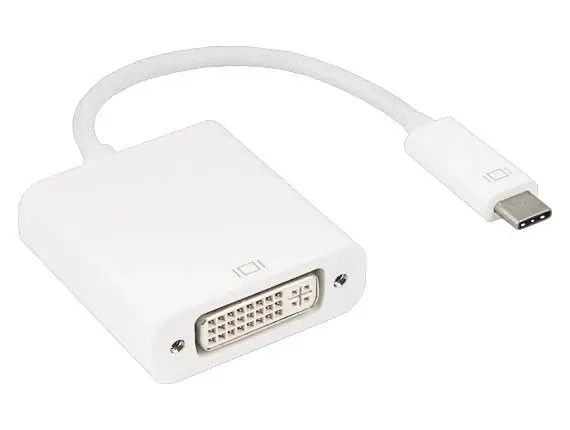
Type-C (USB-C) male to DVI female cable
Description
DESCRIPTION
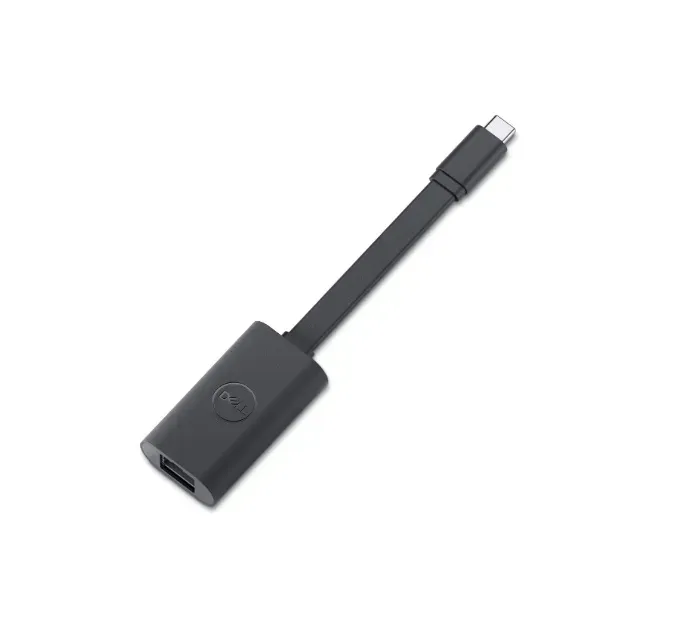
USB‑C male to DVI female adapter is a small video converter cable that lets you connect a USB‑C‑equipped device (like a laptop, tablet, or smartphone) to a display with a DVI input (monitor, projector, or TV).
USB‑C male connector — plugs into the device’s USB‑C port.DVI female port — lets you connect a standard
DVI cable from the adapter to the display.
Key Features
Video Output Support
-
Connects your USB‑C enabled device (laptop, tablet, smartphone) to a DVI display (monitor, projector, TV).
-
Supports common HD resolutions (e.g., 1080p / 1920×1200) and in some adapters even up to WQHD/2560×1440 depending on design.
USB‑C Male → DVI Female
-
USB‑C male connector plugs into your device.
-
DVI female port accepts a standard DVI cable to the display.
DisplayPort Alternate Mode (DP Alt Mode)
-
Uses the USB‑C port’s DisplayPort Alt Mode to output video without needing extra drivers or complicated setup.
Reversible USB‑C Connector
-
The USB‑C plug is reversible — easy to plug in either way (no wrong orientation).
Plug‑and‑Play
-
Most adapters are driver‑free, plug‑and‑play — just connect and the video works.
Bus‑Powered Operation
Broad Device Compatibility
-
Works with many devices that support video over USB‑C (e.g., modern laptops, tablets — including Thunderbolt 3/4 devices).
HDCP Support
-
Support for HDCP (content protection) ensures playback of protected content (e.g., streaming video).
Resolution & Bandwidth
-
Typical adapters support video bandwidth up to ~225 MHz/2.25 Gbps per channel (6.75 Gbps total) and deliver crisp digital video.
Optional Advanced Features (in some models)
-
Some multi‑port adapters include Power Delivery passthrough (to charge your device while in use), USB ports, or Ethernet alongside the DVI output — ideal for docking setups.

Description
DESCRIPTION
USB‑C male to DVI female adapter is a small video converter cable that lets you connect a USB‑C‑equipped device (like a laptop, tablet, or smartphone) to a display with a DVI input (monitor, projector, or TV).
USB‑C male connector — plugs into the device’s USB‑C port.DVI female port — lets you connect a standard
DVI cable from the adapter to the display.
Key Features
Video Output Support
-
Connects your USB‑C enabled device (laptop, tablet, smartphone) to a DVI display (monitor, projector, TV).
-
Supports common HD resolutions (e.g., 1080p / 1920×1200) and in some adapters even up to WQHD/2560×1440 depending on design.
USB‑C Male → DVI Female
-
USB‑C male connector plugs into your device.
-
DVI female port accepts a standard DVI cable to the display.
DisplayPort Alternate Mode (DP Alt Mode)
-
Uses the USB‑C port’s DisplayPort Alt Mode to output video without needing extra drivers or complicated setup.
Reversible USB‑C Connector
-
The USB‑C plug is reversible — easy to plug in either way (no wrong orientation).
Plug‑and‑Play
-
Most adapters are driver‑free, plug‑and‑play — just connect and the video works.
Bus‑Powered Operation
Broad Device Compatibility
-
Works with many devices that support video over USB‑C (e.g., modern laptops, tablets — including Thunderbolt 3/4 devices).
HDCP Support
-
Support for HDCP (content protection) ensures playback of protected content (e.g., streaming video).
Resolution & Bandwidth
-
Typical adapters support video bandwidth up to ~225 MHz/2.25 Gbps per channel (6.75 Gbps total) and deliver crisp digital video.
Optional Advanced Features (in some models)
-
Some multi‑port adapters include Power Delivery passthrough (to charge your device while in use), USB ports, or Ethernet alongside the DVI output — ideal for docking setups.
Reviews
Sign in to leave a review